Install & first runs
Install just this family — one plugin, 16 skills. The security-report lifecycle, from intake through CVE publication.
Once you have added the marketplace:
/plugin install magpie-security@apache-magpie
/plugin install magpie-security-tools@apache-magpie   # the framework tools the skills run
New to Magpie? The quick start walks the whole path in
one place — install, the first /magpie-setup:setup run, and a recording of it
happening — plus the other agents and the secure-isolation setup to run next.
The first security skill you run opens with a one-minute
welcome guide:
the typical flow, configuring Magpie, what to ask it, and how to make it yours.
Dismiss it, or hide it for good, from its last line;
“show the security welcome again” or /magpie-setup:welcome-guide security brings it back.
Before the first run

Illustrative — the real run derives more and asks better. What is true is the shape: it runs itself, it writes only your personal layer, and it stages nothing.
Every skill here resolves project-specific values from the adopter’s
<project-config>/ directory — which is
your personal layer first — .apache-magpie-local/ (gitignored) in a
project that adopted Magpie, <git-common-dir>/apache-magpie/ in one
that did not — then .apache-magpie-overrides/ (committed, the project’s).
For yourself: /magpie-setup:setup config scaffolds and fills these locally
(/magpie-setup config on a pinned-snapshot install).
Nothing is staged, nothing is committed, and it works on a repository that
has never adopted Magpie.
For the project: /magpie-setup:setup adopt
commits them for every contributor, either scaffolded directly or promoted
from what you configured locally.
Required. Without these a skill would act on a guess, so it stops and says which file is missing.
| File | What it carries | Read by |
|---|---|---|
canned-responses.md |
Reusable reporter-facing reply templates. | issue-invalidate, issue-triage |
fix-workflow.md |
Fork / clone / toolchain specifics, backport-label policy, commit-trailer wording, PR scrubbing, private-PR fallback. | issue-fix |
milestones.md |
Milestone naming conventions + create-and-assign recipe. | issue-sync |
project.md |
Project manifest. Identity, repositories, mailing lists, tools enabled, CVE tooling, GitHub project-board + issue-template field declarations. The single file every skill reads to resolve project-scoped references. | cve-allocate, issue-deduplicate, issue-fix, issue-import, issue-import-from-md, issue-import-from-pr, issue-import-from-scan, issue-import-via-forwarder, issue-invalidate, issue-triage, model-verify, submit-to-oss-scan, tracker-stats-dashboard |
release-trains.md |
Active release branches, release-manager attribution per cut, rotation rosters, security-team roster. | issue-triage |
scanner-products.md |
Private scanner product names, and the finder-anonymisation rule applied before anything is quoted publicly. | issue-sync |
scope-labels.md |
Scope label → CVE product / packageName / collection-URL mapping. Exactly one scope label per tracker. |
issue-deduplicate, issue-import-from-md, issue-import-from-pr, issue-triage, tracker-stats-dashboard |
security-intake-config.md |
Capability-flag vocabulary for the intake path: how reports arrive, what counts as in scope, and what a receipt says. | issue-import |
security-model.md |
Authoritative URL for the project’s Security Model + known-useful anchors + drafting rule. | issue-triage, model-prepare, model-update, model-verify, submit-to-oss-scan |
security-tracker-stats.md |
Which tracker fields and windows the stats dashboard reads, and what it publishes. | tracker-stats-dashboard |
title-normalization.md |
Regex cascade the security-cve-allocate skill applies to tracker titles before pasting them into the CVE-tool allocation form. |
cve-allocate |
Optional. Each has a documented fallback; absent, the skill still runs.
| File | What it carries | Read by |
|---|---|---|
distributor-list.md |
The embargo distributor list a pre-announcement goes to, and what it may contain. Absent, no pre-announcement is proposed. | issue-sync |
naming-conventions.md |
Project-specific editorial rules. Keep only the ones that differ from the generic rules in ../../AGENTS.md. |
issue-sync |
privacy-llm.md |
Which model tier may see which class of content, for projects routing foundation-private information away from third-party models. | issue-import |
Works well with
Third-party packages, none of them required: this family works with none of them installed, and Magpie neither bundles nor depends on any. They are named because they are what a maintainer goes looking for next, and because the answer differs by agent.
Aikido Security — Aikido
SAST, secrets and infrastructure-as-code scanning surfaced in the session.
With this family: A second opinion from a conventional scanner, and a different class of finding — committed secrets — from the ones a code-reading scan surfaces.
Available on Claude Code only.
Claude Security — Anthropic
A multi-agent vulnerability scan of your own repository, run inside the session; each finding carries a severity, a CWE category and reproduction steps, and the ones you pick become patch files you review before applying.
With this family: This family handles reports that arrive — intake, triage, CVE, advisory. Scanning finds the ones nobody reported. The two meet at security-issue-import-from-scan, which imports scanner output as trackers.
Available on Claude Code only.
Claude Code only: it drives subagents and a scan workflow that Agent Plugins 1.0 has no component for. Listed with its harness named rather than presented as the answer for everyone.
Install commands per agent are in Companion skill packages.
Try these first
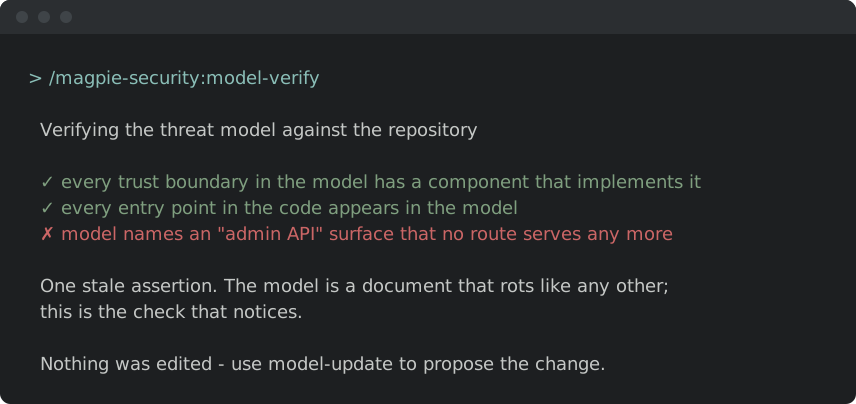
Illustrative shapes, not real transcripts — your output will differ. Nothing below sends, merges, or posts anything without you confirming it.
Pull new reports out of the mailbox.
/magpie-security:issue-import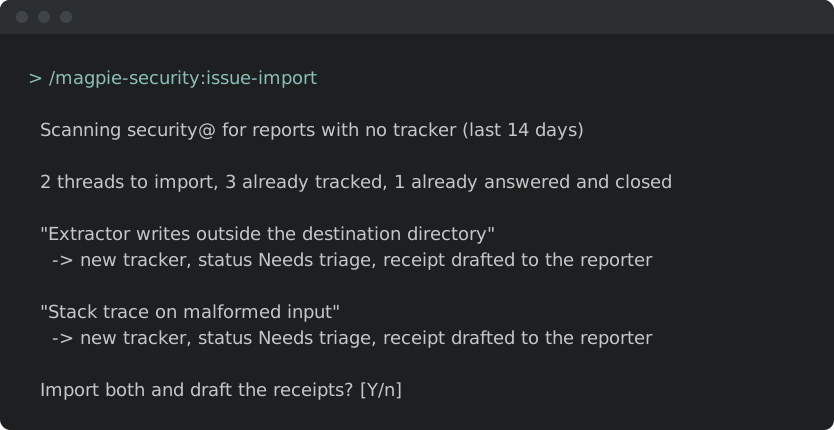
Triage what came in.
/magpie-security:issue-triage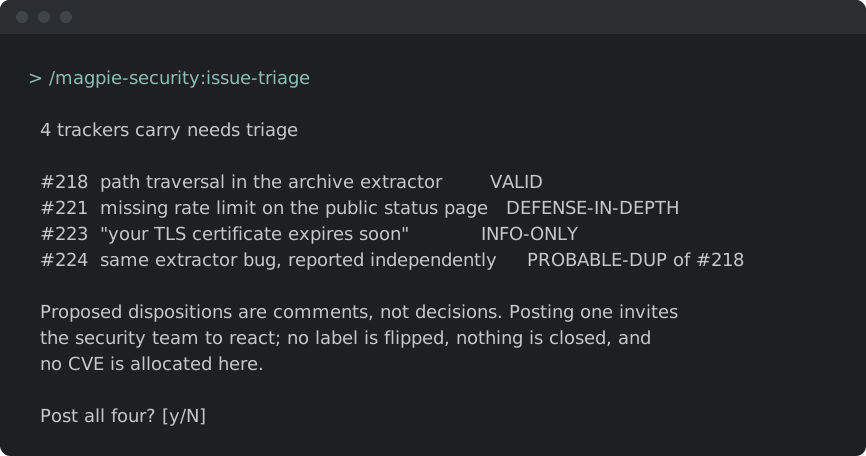
Check the security model still matches reality.
/magpie-security:model-verify