Install & first runs
Install just this family — one plugin, 2 skills. Review your own change before anyone else has to.
Once you have added the marketplace:
/plugin install magpie-pairing@apache-magpieNew to Magpie? The quick start walks the whole path in
one place — install, the first /magpie-setup:setup run, and a recording of it
happening — plus the other agents and the secure-isolation setup to run next.
The first pairing skill you run opens with a one-minute
welcome guide:
the typical flow, what needs configuring, what to ask it, and how to make it yours.
Dismiss it, or hide it for good, from its last line;
“show the pairing welcome again” or /magpie-setup:welcome-guide pairing brings it back.
Before the first run
Nothing here has to be configured. These skills read the file below
when it exists — yours in your personal layer or the project’s in
.apache-magpie-overrides/ — and fall back to a documented default when
it does not.
Optional. Each has a documented fallback; absent, the skill still runs.
| File | What it carries | Read by |
|---|---|---|
project.md |
Project manifest. Identity, repositories, mailing lists, tools enabled, CVE tooling, GitHub project-board + issue-template field declarations. The single file every skill reads to resolve project-scoped references. | multi-agent-review, self-review |
Works well with
Third-party packages, none of them required: this family works with none of them installed, and Magpie neither bundles nor depends on any. They are named because they are what a maintainer goes looking for next, and because the answer differs by agent.
Code Review — Anthropic
Automated pull-request review through several specialised agents, scored by confidence.
With this family: Runs the same kind of pass over a PR that self-review runs over your local diff.
Available on Claude Code only.
roborev — Kenn Software (community, MIT)
A local CLI and daemon that reviews every commit in the background with the coding agent you already use, and feeds the findings back for a fix-and-re-review loop before you push.
With this family: self-review is a one-shot read of your local diff; roborev keeps reviewing each commit as you make it and drives the fix and re-review loop until the branch is clean.
Available on Claude Code, OpenAI Codex CLI, VS Code / GitHub Copilot, Google Antigravity, Cursor.
On Claude Code under Magpie’s secure agent setup, roborev cannot read ~/.roborev/ and fails on every call; Step B of setup-isolated-setup-install wires the exclusion and the prompt that keep it safe outside the sandbox, and Step B.2 optionally lets its post-commit hook review the agent’s own commits. Without Homebrew, see https://roborev.io/docs/installation/ for the other installers.
Superpowers — obra (community)
A skills library and development methodology: brainstorming, plan writing, subagent-driven execution, systematic debugging.
With this family: self-review and multi-agent-review are pre-flight reads of your own diff; Superpowers adds the test-first and systematic-debugging habits upstream of them.
Available on Claude Code, OpenAI Codex CLI, VS Code / GitHub Copilot, Google Antigravity, Cursor, OpenCode.
Installing it means first adding a marketplace Magpie does not publish — obra/superpowers-marketplace. The install flow asks before it does, and names whose it is.
Ships a plugin manifest per harness and one shared skills/ tree, the same shape Magpie uses, so it is not a Claude Code-only package.
Install commands per agent are in Companion skill packages.
Try these first
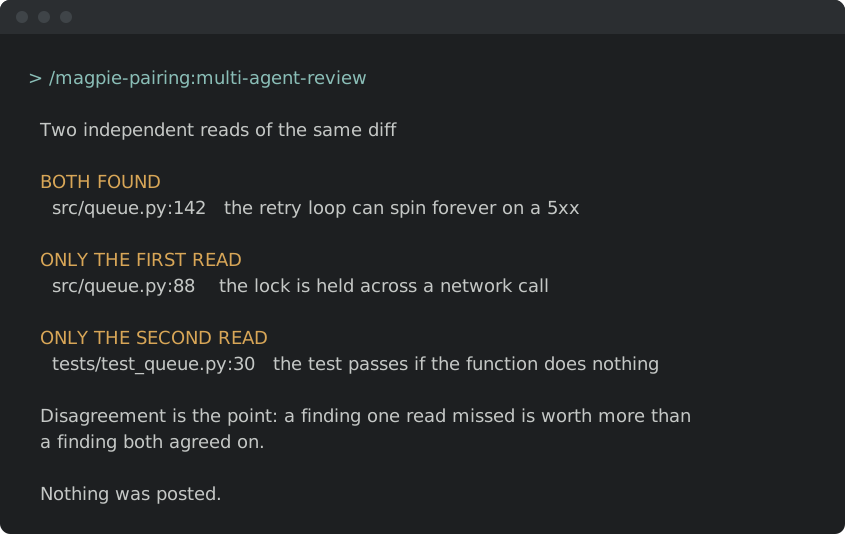
Illustrative shapes, not real transcripts — your output will differ. Both skills are read-only: nothing is sent, merged, or posted.
Self-review before you push.
/magpie-pairing:self-review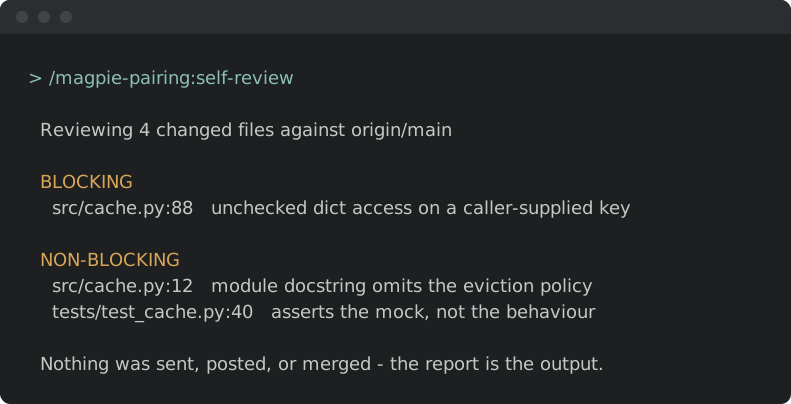
Send it through an adversarial panel.
/magpie-pairing:multi-agent-review